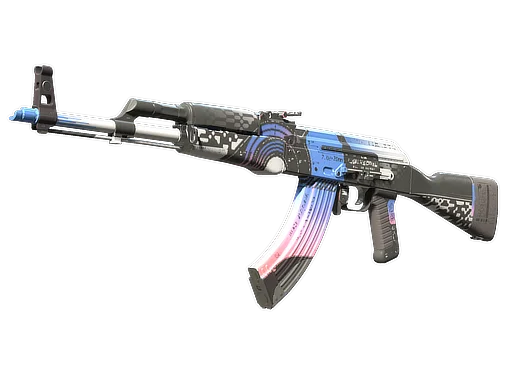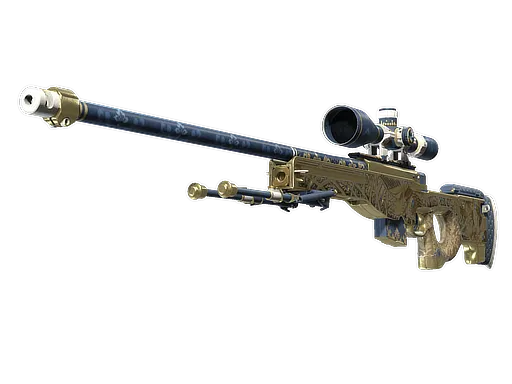

What is the Dead Hand Terminal?
The Dead Hand Terminal is a Sealed Terminal — a new type of container introduced by Valve for the Dead Hand Collection in 2026. It is the second Sealed Terminal ever released in CS2, following the Genesis Terminal that accompanied the Genesis Collection. Like its predecessor, the Dead Hand Terminal does not follow the traditional case-plus-key model. Instead, it uses a structured marketplace offer system where Valve presents you with a specific item at a set price, and you choose whether to accept or pass.
The Terminal contains items from the Dead Hand Collection, which features a distinctive Japanese-influenced aesthetic spanning weapon skins in every rarity tier from Mil-Spec through Covert, plus an extensive lineup of 22 new glove finishes — the first new gloves added to CS2 since the Broken Fang collection in December 2020.
Key characteristics of the Dead Hand Terminal:
- No key required — You do not need to purchase a separate key to open it
- Structured marketplace offers — Valve presents specific items at specific prices rather than delivering a random item
- Up to 5 re-rolls — You can decline up to 4 offers and receive a 5th, final offer before the Terminal is destroyed
- Original Owner Certificate — Items received carry a certificate naming the first player to acquire them
- No RNG on the item itself — The float value and condition of the item are determined and shown before you accept
How to Get the Terminal
There are three ways to obtain a Dead Hand Terminal. The method you choose affects your total cost and the expected value of opening it.
Method 1: Weekly XP Drop
The primary distribution channel for Sealed Terminals is the CS2 weekly drop system. Every week, CS2 awards players items for filling their weekly XP bar through normal gameplay — matchmaking rounds, Deathmatch, Premier, and other modes all contribute XP. The Dead Hand Terminal can appear as one of your weekly drops during the period when Valve designates it as an active drop item.
This is the best way to get a Terminal because the Terminal itself costs you nothing. Your only expenditure is the cost of the marketplace offer you accept when unsealing it. A player who earns the Terminal for free and accepts even a modest Mil-Spec offer is still receiving real value from a zero-upfront-cost container.
Method 2: Steam Community Market
Once Terminals enter the economy via drops, players who do not want to open them can list them on the Steam Community Market. Prices fluctuate based on supply (how many weeks the Terminal has been available as a drop) and demand (how desirable the Dead Hand Collection items are). The Steam Market takes a 15% fee on sales, which is factored into listing prices.
Buying on the Steam Market is convenient and carries no scam risk, but prices may be higher than third-party platforms and you can only use Steam wallet funds to purchase.
Method 3: Third-Party Marketplaces
Platforms such as Skinport, CSFloat, DMarket, and others list Terminals at prices that often undercut the Steam Market by 10–20% because they operate on real money rather than Steam wallet balance. Always verify the platform is reputable and check whether the Terminal has any trade restrictions before purchasing. Check the live Sealed Dead Hand Terminal price to compare every major platform at once.
Opening the Terminal Step-by-Step
The unsealing process for the Dead Hand Terminal differs significantly from opening a traditional CS2 case. Here is exactly what happens at each stage:
Step 1: Unseal the Terminal
Navigate to your CS2 inventory and select the Dead Hand Terminal. Choose "Unseal" from the context menu. Unlike cases, you will not be prompted for a key — the Terminal unseals at no additional cost at this stage. The unseal action is immediate and irreversible: once you begin the process, you must see it through to completion.
Step 2: Receive Your First Marketplace Offer
After unsealing, Valve's system generates your first marketplace offer. This offer shows you the specific item being offered, its wear condition and exact float value, whether it has StatTrak, and the price Valve is asking for it. The price is set by Valve and reflects a marketplace-competitive rate for that item at that float. You see the full item details and cost before committing any funds.
Step 3: Accept or Re-Roll
You have two choices upon seeing each offer: accept the item by paying the listed price, or decline and receive a new item at a new price. You may decline up to 4 times for a total of 5 offers seen. Each new offer is drawn independently — there is no guarantee the next offer will be better or worse than the current one.
Step 4: Accept an Offer or Lose the Terminal
If you decline all five offers, the Terminal is permanently destroyed. You receive no item, no refund, and no compensation. This is the core risk of the re-roll mechanic — the Terminal has real monetary value, and choosing to reject all five offers means losing that value in its entirety. Plan your re-roll strategy before you begin unsealing.
Step 5: Receive Your Item
Once you accept an offer, the item is delivered to your CS2 inventory with an Original Owner Certificate. It is subject to the standard trade hold period if applicable, after which it is fully tradeable and marketable on any CS2 trading platform.
| Step | Action | Cost at This Stage |
|---|---|---|
| 1 | Unseal the Terminal | None — no key required |
| 2 | First marketplace offer shown | Nothing yet — view only |
| 3 | Accept or decline (up to 5 total offers) | Paid only when you accept |
| 4 | Decline all five — Terminal is destroyed | Terminal value lost, no refund |
| 5 | Receive item with Original Owner Certificate | Offer price charged to Steam wallet |
Re-Roll Strategy Tips
The re-roll system fundamentally changes the decision calculus compared to a traditional case opening. You are no longer gambling on what you get — you are making a choice about whether a better offer might appear if you decline the current one. This rewards players who understand the Dead Hand Collection's value distribution.
When to Accept the First Offer
Accept immediately if the first offer presents any of the following:
- A Covert (red rarity) item — AWP Queen's Gambit or Glock-18 Fully Tuned — at a price at or below current market rates
- A glove item from any of the 22 Dead Hand glove finishes, which represent the rarest and most in-demand items in the collection
- A StatTrak variant of any Classified or Covert skin, where the StatTrak premium is locked in by the offer
- Any item with a notably low float value that carries a visible collector premium compared to standard float copies
When to Re-Roll
Consider declining and re-rolling when:
- The offer is a Mil-Spec (blue) skin at a price above what comparable copies sell for on the open market — you could simply buy that skin cheaper directly without using the Terminal
- The offered price is significantly above current Steam Market or third-party platform rates for the same item and condition
- You entered the Terminal specifically seeking gloves or high-rarity weapon skins, and the offer does not match your target
The Expected Value Framework
Think of each re-roll as a new random draw from the Dead Hand Collection's item pool, weighted by rarity. The collection contains far more Mil-Spec and Restricted items than Classified or Covert items, so statistically most offers will show lower-rarity skins. Re-rolling a mediocre blue skin offer when you received the Terminal for free is a reasonable gamble. Re-rolling a Classified or Covert offer is only advisable if the price presented is meaningfully above current market value for that specific item.
The Fifth Roll — Your Last Chance
On the fifth roll you must accept or lose the Terminal entirely. As a general rule: on the final roll, accept any item whose market value exceeds the current secondary market price of the Terminal itself. If the fifth offer is for a Mil-Spec skin worth less than what you paid for the Terminal, the loss on the Terminal value is already locked in — forfeiting the Terminal on top of that loss compounds the damage unnecessarily.
Dead Hand Terminal vs. Traditional Loot Boxes
The Sealed Terminal mechanic represents a meaningful departure from the traditional CS2 case system. Understanding the differences helps you decide whether Terminals or conventional cases better fit your goals and risk tolerance.
| Feature | Traditional Case | Sealed Terminal |
|---|---|---|
| Requires a key? | Yes (~$2.50) | No |
| Item known before payment? | No — pure RNG reveal | Yes — full details shown upfront |
| Price known before payment? | No | Yes |
| Player agency? | None — accept whatever drops | Up to 5 offers to evaluate |
| Can you walk away empty-handed? | No — always receive an item | Yes — if you decline all 5 |
| Original Owner Certificate? | No | Yes |
The key philosophical difference is player agency versus pure chance. Traditional cases are straightforward loot boxes — you pay a fixed amount, you get something random, full stop. The Terminal adds a layer of decision-making that appeals to players who want some control over their outcome. Both the item and its price are visible before you commit funds, which represents a meaningful improvement in consumer transparency. Whether this makes Terminals "better" than cases depends entirely on your personal approach to risk and your goals in CS2 cosmetics.
From a regulatory standpoint, the Sealed Terminal model has been discussed as a potential response to loot box legislation in various jurisdictions, since the player always sees exactly what they are buying and exactly what it costs before completing a purchase — more similar to a regular marketplace transaction than a traditional loot box.
Original Owner Certificate Explained
Every item received through the Dead Hand Terminal carries an Original Owner Certificate — a permanent attribute visible when inspecting the item. The certificate records the Steam username and profile of the first player who received that specific item from the Terminal.
What It Means in Practice
The Original Owner Certificate functions as a provenance record. It grants no gameplay advantages or additional visual modifications beyond the certificate text. However, it carries several meaningful implications for collectors and traders:
- Verified first ownership — Buyers can confirm the item's history, adding a layer of authenticity and traceability that secondary market items lack. This is particularly relevant for high-value gloves and Covert skins where premium pricing is the norm
- Notable account premiums — An item whose Original Owner is a well-known player, streamer, or professional CS2 figure carries additional social and collector value, analogous to autograph memorabilia in physical sports collectibles
- Long-term provenance value — As the CS2 item economy matures, provenance records have the potential to become increasingly valued by high-end collectors, especially for items from the early Dead Hand Collection release period
Does the Certificate Affect Trading?
No. The Original Owner Certificate does not restrict trading, listing on the Steam Market, or selling on third-party platforms. An item with a certificate trades identically to a non-certificate item from a mechanical standpoint. The certificate is purely informational — it travels with the item permanently regardless of how many times it changes hands thereafter.
Can the Certificate Be Removed?
No. The Original Owner Certificate is a permanent attribute attached to the item at the moment of first acquisition from the Terminal. It cannot be scraped, removed, or modified by any party, including Valve.
Weekly Drop Odds & Timing
Understanding how the CS2 weekly drop system works is important for planning whether to pursue a Terminal through gameplay or purchase one on the market.
How the Weekly Drop System Works
CS2 awards weekly drops based on XP earned during the previous reset period. Playing any official game mode — Competitive, Premier, Deathmatch, Arms Race — earns XP that fills a weekly bar. Once the bar fills, you receive a drop. Multiple drops can be earned in a single week by continuing to fill the bar after the first drop is awarded, with the XP required for each additional drop in a week typically scaling upward.
The pool of possible weekly drops includes standard cases from the current active rotation, cases from Valve's rotating bonus pool, and Sealed Terminals when Valve has designated them as active drop items. The Dead Hand Terminal is in the active drop pool during the Dead Hand Collection release period.
Drop Rates and Timing
Valve does not publish exact probabilities for each item in the weekly drop pool. Based on community observation of prior Terminal releases with the Genesis Collection:
- Terminals appear to have drop rates broadly comparable to standard cases — dedicated players filling the XP bar consistently will see Terminals appear among their drops periodically during the active window
- The most efficient XP path is through Competitive and Premier matchmaking, where XP per match is highest relative to time investment
- Weekly drops reset on Thursday at 00:00 UTC for most regions — plan your play sessions to maximize opportunities before and after each reset
- Players who cannot play every week can still accumulate Terminal drops on weeks they do play — the drop pool simply resets, it does not carry over unfilled XP
How Long Will Terminal Drops Last?
Valve typically keeps a new Terminal in the active drop pool for several weeks to months after the associated collection launches. Once Valve transitions the Dead Hand Terminal out of the active drop pool, it will only be obtainable through the secondary market. Supply on the secondary market generally tightens over time if player interest in the collection remains strong, which could push Terminal prices upward as free drops cease.
Compare Dead Hand Collection Prices Across 40+ Marketplaces
Check real-time prices for every Dead Hand item on SteamAnalyst. We aggregate pricing from Buff163, Skinport, CSFloat, DMarket, Steam Market, and more so you can evaluate any Terminal offer against current market rates instantly.
FAQ
How much does the Dead Hand Terminal cost?
The Terminal itself is free if you receive it as a weekly XP drop in CS2. On the Steam Community Market and third-party platforms it trades at prices that fluctuate with supply and demand — typically lower than traditional cases because it requires no separate key. Each marketplace offer inside the Terminal costs additional funds, and prices vary per item presented by Valve.
Can you get Dead Hand gloves from the Terminal?
Yes. The Dead Hand Collection contains 22 new glove finishes across multiple glove types, and any of them can appear in a marketplace offer when you unseal the Terminal. Glove offers are generally priced higher than weapon skin offers due to their rarity and the exceptional demand for new glove finishes — the first since December 2020, over five years after the last new gloves were added to CS2.
Is it worth opening the Dead Hand Terminal?
Whether it is worth opening depends on the price of the Terminal itself versus the expected value of items you might receive. If you acquire the Terminal for free via a weekly drop, the expected value is almost always positive since you only pay for the specific item you choose to accept. If you purchase a Terminal on the market, compare its cost against the average item prices in the collection before deciding. Use SteamAnalyst to get current market prices for all Dead Hand items.
Can you trade items received from the Dead Hand Terminal?
Yes. Items received from the Terminal become standard CS2 inventory items subject to normal Steam trade hold periods. Once the trade hold expires, the item is fully tradeable and marketable on any platform that accepts CS2 items. The Original Owner Certificate does not restrict trading in any way — it travels with the item but does not impose any limitations.
What happens if you decline all five offers?
If you decline all five marketplace offers during the Terminal unsealing process, the Terminal is permanently destroyed. You receive nothing — no refund, no compensation, no way to recover the Terminal. Always accept an offer before exhausting all five rolls unless you are deliberately willing to forfeit the Terminal's full value. This is not a decision to make impulsively — plan your thresholds before you start unsealing.